
Creating Variables
You can create variables for any dimensional or material property, or output value. Variables can be Design variables or Project variables. Once a variable has been created, parametric sweeps, optimization, sensitivity and statistical analysis can be performed.
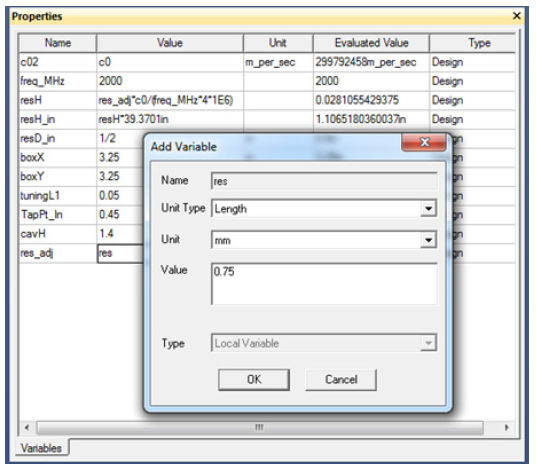
Variable Creation
When you specify a variable in the Properties window for a particular dimension the Add Variable dialog appears. In this dialog you can define the Value, Unit, and the Unit Type for the variable.
You can also define variable as you create the object. For example, suppose you want to create a box and variables for the length, breadth, and height of the box. To do this, enter the variable name for the different dimensions. For each variable name you enter, the Add Variable dialog box appears prompting you to specify a value for the defined variable.
There are two types of variables in HFSS: design variables and project variables. Project variables can be assigned to any parameter value within the HFSS project where it was created. By contrast, design variables can be assigned only to a parameter value within the design where it was created. A project may contain many designs, so depending on how often a variable is used and where you can determine what type of variable to use.
Regardless of the type of variable, it always represents a numerical value, mathematical expression, or mathematical function that can be assigned to a design parameter in HFSS. Variables are very useful in situations where a parameter value is changed often, if it is desired to perform a parametric analysis, perform an optimization, or intend to create an output variable to which HFSS is desired to converge to.