
Assigning and Creating Materials
All 3D objects in HFSS must have a material property
assigned to them. Objects are assigned a default material during the
3D object creation process. The material assigned to a given object can
be changed at any time after the object is created.
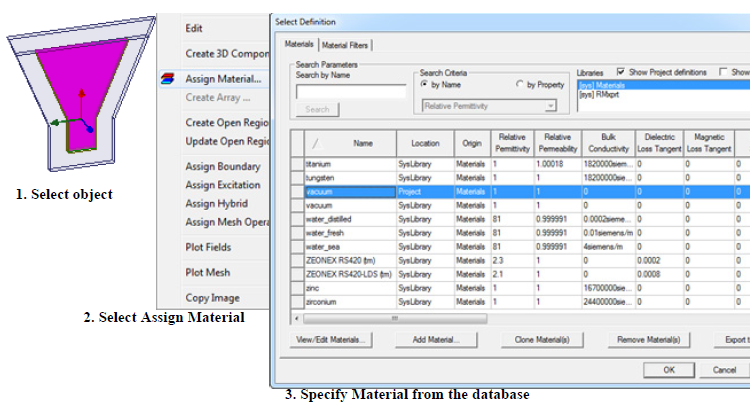
Material Assignment process
You can also define or change the material property of an object, from the Edit Libraries window. To bring up this window, go to the Tools menu and select the Edit Libraries > Materials. Select the material from the database and click OK to assign the desired material on the object.
There are other methods to assign materials. After you create an object the Properties window appears. The Properties window is also docked with the Project Manager window. Upon creation of a new object, go to the Attribute tab on the Properties window. From the Materials drop-down menu select Edit and open the Select Definition window and specify the desired material from the database.
If you double-click the object name in the command history tree, the Attribute dialog box appears where you can change the material.
If a particular material is not found in the default HFSS material database, a custom material can be created. Frequency-dependent material can also be created if needed.
To add a material to the database, simply access the materials database and click on the Add Material button at the bottom of the dialog box. Simply enter a name along with the desired material properties and close the dialog by clicking OK. The created material is automatically assigned to the 3D object.
Frequency-dependent materials can be based on four distinct definitions: Piecewise-linear, Debye, Djordjevic-Sarkar, or as a collection of data points. Each method creates a material that has specific material properties as a function of frequency.
The Piecewise Linear and Frequency-Dependent Data Points models apply to both the electric and magnetic properties of the material. However, they do not guarantee that the material satisfies causality conditions, and so they should be used only for frequency-domain applications.
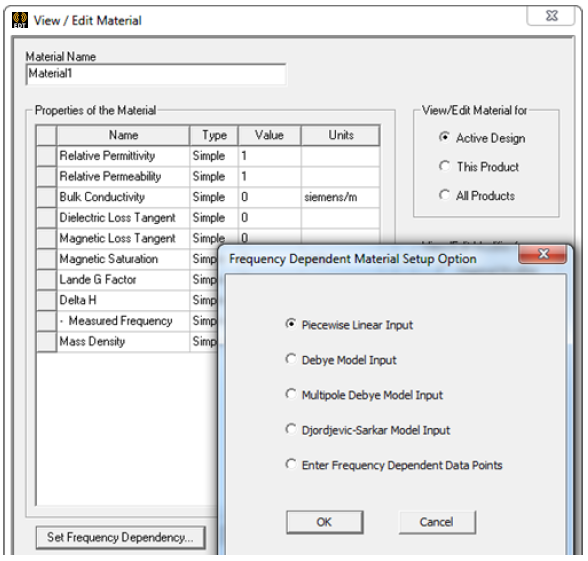
Custom material creation
The Piecewise linear model defines a material that has three distinct regions. The first region has a flat constant dielectric property, the second has a linear slope, and the last section is flat again. You can specify the break frequencies between sections one and two and sections two and three.
The Debye and Djordjevic-Sarkar models apply only to the electrical properties of dielectric materials. These models satisfy the Kramers-Kronig conditions for causality, and are preferred for applications where HFSS results, both S-parameter and equivalent circuit, will be used in a time-domain simulation.
The Debye model is a single pole model for the frequency dependency of a lossy dielectric. You can specify the two frequencies along with the dielectric constant and loss tangent at those frequencies. If desired, you can also specify the permittivity at an optical frequency and DC conductivity and constant relative perme- ability.
For the Djordjevic-Sarkar model, you can specify the permittivity and loss tangent at a single frequency. Additionally, you may enter the conductivity and permittivity at DC. This model was specifically developed for materials that are commonly used in printed circuit board and package designs.