
Specifying Source Contexts for Creating Radiated Field Reports
For Driven Modal and Terminal Analysis solution types that involve near or far fields, a Source Contexts tab appears on the Edit post process sources dialog box. This provides a means to select the sources to use as context when creating a radiated field report. The Source Contexts tab lists the same sources as the Spectral Fields tab. Sources are scaled by exciting a single source (the selected context in the reporter dialog) while turning off all other sources.
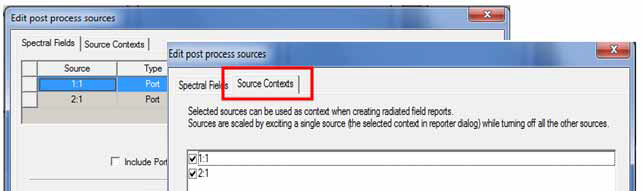
All types of sources can be enabled as Source context (ports, currents, incident waves). The default for all sources is "disabled". This applies to newly created sources and sources in legacy projects.
Each singly selected source is excited with factory default values. The phase will always be 0 deg and the magnitude will be 1 Watt for modal design and 1 Volt (Total voltage) for terminal design. These factory default values cannot be changed by users.
Design Edit post process sources settings such as "Include Port Post Processing Effects" are applicable for these singly excited sources. Thus changing any setups on the first tab of the Edit post processing sources dialog invalidates all traces that are defined with source context.
Enabling any source as context does not impact traces that are already defined
Disabling source as context invalidates an existing trace that uses that source as context.
This Edit post process sources selection applies to a Source selection in the Reporter that allows you to excite a single source.
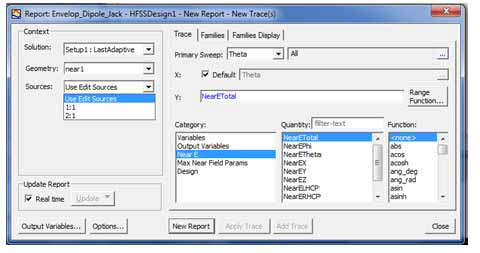
The Reporter Context selection for "Sources" appears when there is at least one source selected for "Source Contexts". The default selection of this combo box is "Use Edit Sources". When a source is selected, the Edit Sources setup in the design will be ignored during trace population. Instead, the trace will be calculated with the selected source excited while turning off all the other sources in the design. The above figure illustrates the extended Create Near Field Report dialog box. Note that "1" and "2" are port names and each has 1 mode.
For an example use of these features, see the User Defined Solution for MIMO Calculations example, that describes python scripts for the Toolkits and User Defined Solution features to generate calculations and reports.