
Specifying the RAM Limit Percentage
The RAM Limit (%) setting requests a restriction on the amount of memory the default solver used by the Ansys Electronics Desktop may allocate before it must stop solving on-core—solving processes entirely in memory—and start solving off-core. In off-core mode, the solver creates temporary solution files to which it spills, or shifts, data from memory, instead of relying on the operating system to start disk swapping. The default solver is finely tuned at handling its own memory, and can optimize loading only those blocks of memory required for its immediate needs.
Using this option may help to keep the entire solver from being swapped out in the normal course of process management on your computer. This kind of control may be especially important when multiple solvers are running on the same machine. Of course, if the total memory requirement of all processes grows large enough, the operating system will be forced into disk swapping.
The Iterative solver doesn't go off-core for efficiency reasons. Once the limit is exceeded, iterative solver will issue an "Out of memory" error message.
Regardless of this setting, processes are limited to 4TB of address space on 64 bit operating systems - no matter how much physical memory is installed.
Regardless of the RAM Limit setting, if allocation fails, the solvers will automatically switch to off-core mode.
In case you receive an error message regarding insufficient memory on a 64-bit operating system, you may have reached a point where the sum of physical RAM plus available swap space exceeds the minimum amount of RAM needed by the off-core solver. Even for the off-core solver, the RAM usage cannot be made arbitrarily small. Off core does not mean it will use system swap space. Instead, the solver actively uses disk space to solve the problem. Users specify the % RAM allowed to be consumed by the solver on each node. The solver checks the total RAM on the node and applies the % RAM to arrive at the total memory that can be used. However, if you allow off core and it did not complete the solve the message estimates the minimum memory required to solve the off core solve.
For Linux schedulers, where the environment may be non-uniform/heterogeneous, you have the option of using a batchoption to specify a RAMLimitPerCoreInGB. See the discussion under Distribution Command Line Options.
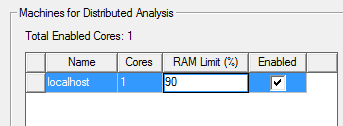
To specify the RAM Limit (%) of the machine on which Ansys Electronics Desktop s installed:
- Click Tools>Options>Setting HPC and Analysis Options.
- This opens the HPC and Analysis Options dialog.
- Specify the Design Type for which you want to set a RAM limit. Make the Local machine Active.
- In the HPC and Analysis Options dialog click the Edit button.
This opens the Analysis Configuration dialog.
- Select the Machines
tab. specify a RAM Limit (%) in
the text field for the active machine list.
- This setting affects all projects for the current configuration
for the user and machine..
Note:
Ansys recommends that you use the RAM Limitsetting if you wish to limit the RAM that the MPS (default) solver may allocate. However, the Iterative solver doesn't go off-core for efficiency reasons. Once the limit is exceeded, iterative solver will issue an "Out of memory" error message.
Allocation of greater than 2 GB of RAM on 32-bit hardware platforms is only possible with the appropriate operating system and boot settings, even if more than 2 GB are physically installed.