
Edit Menu for Layout Editor
When the Layout Editor is active in the Design Area, the Edit menu appears similar to the following:
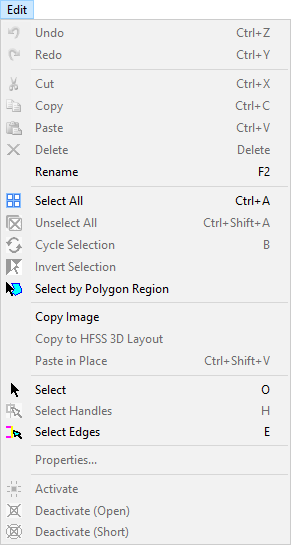
The Layout Editor Edit menu contains the following options:
- Undo – allows you to undo the last action, which is specified after "Undo."
- Redo – allows you to redo an undone action, which is specified after "Redo."
- Cut / Copy / Paste – allows you to copy and paste layout elements.
- Delete – deletes a selected element.
- Rename – renames a selected element.
- Select All / Unselect All – selects or deselects the entire layout.
- Cycle Selection – rotates through a selection of objects.
- Invert Selection – selects the opposite of the current selection.
- Select By Polygon Region – allows you to draw a polygon in the design area and selects all elements within that polygon.
- Copy Image – copies the design area display in bitmap format, for pasting into another program or document.
- Copy to HFSS 3D Layout – copies the design into an HFSS 3D Layout and adds that layout to the current project.
- Paste in Place – duplicates an object without any X / Y offset or displacement.
- Select – puts the cursor in "Select" mode (the default).
- Select Handles – puts the cursor in "Select Handles" mode; the cursor will only select handles.
- Select Edges – puts the cursor in "Select Edges" mode; the cursor will only select edges.
- Properties – opens the relevant Properties window for the selected object.
- Activate – causes the activation of one or more selected components.
- Deactivate (Open) – temporarily converts the component into an open circuit.
- Deactivate (Short) – temporarily converts the component into a short circuit.