
Wave(coax) Ports
Coaxial wave ports can be used to excite solderballs at component interfaces. A wave port represents the region through which electromagnetic energy enters or exits the solution space. In Electronics Desktop, a wave port is treated as if it were a semi-infinitely long waveguide or transmission line of the exact same cross-section attached to the model where it’s excited. Wave ports assigned on waveguide structures are defined by the cross-section of the waveguides. For transmission lines (i.e. microstrip, coplanar waveguides, slotline etc.) ports should be defined carefully. Placement of a wave port is critical since it can affect the accuracy of the solutions.
If a coaxial wave port is placed on a component (e.g., a flip-chip), the reference plane is changed to a volume body with a thickness given by the "PEC Launch Width" property. This reference plane provides the required PEC backing for the wave port. Otherwise, the port is modified based on launch-width and becomes the Perfect Electric Conductor (i.e., PEC) instead.
Complete these steps to create a wave port using an existing Gap(coax) port.
-
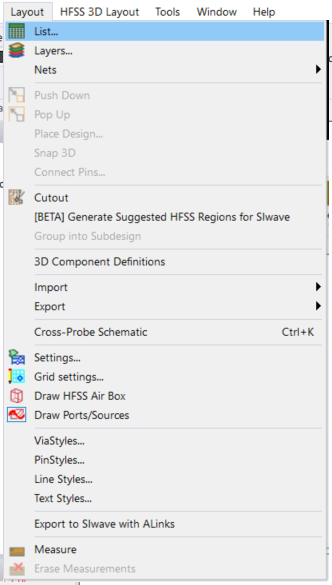
Navigate to Layout > List to open the Design List window.
-
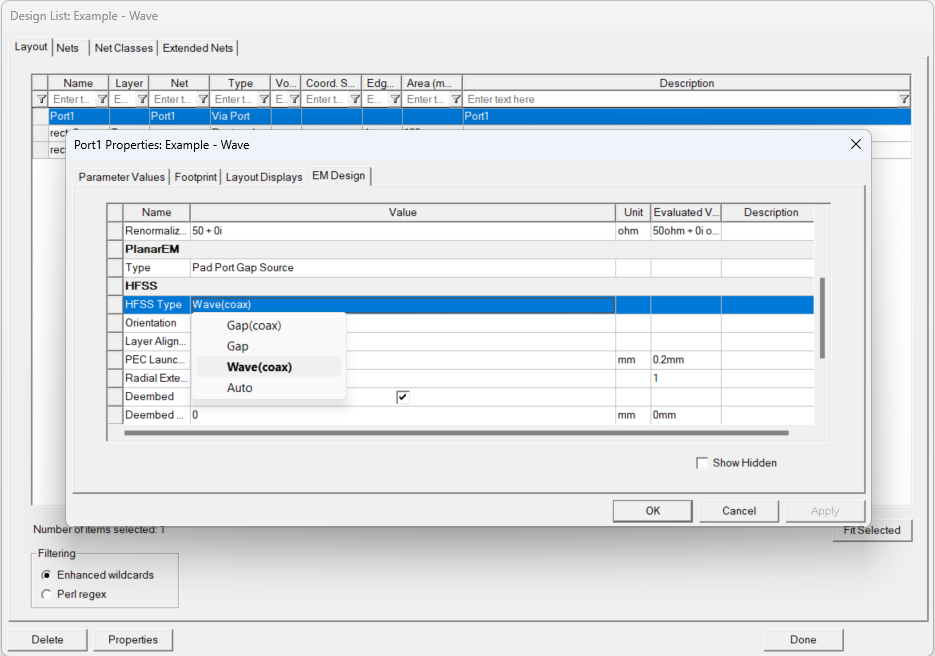
Select a port from the table and click Properties to open its individual Properties window.
-
From the HFSS section of the Parameter Values tab, select Wave(coax) from the HFSS Type drop-down menu.
-
Click OK to close the Properties window.