
Manual Tx Zero Placement
Text Placement:
For Butterworth and Chebyshev I filters:
-
Click Add Tx Zeros in the Filter Attributes group box.
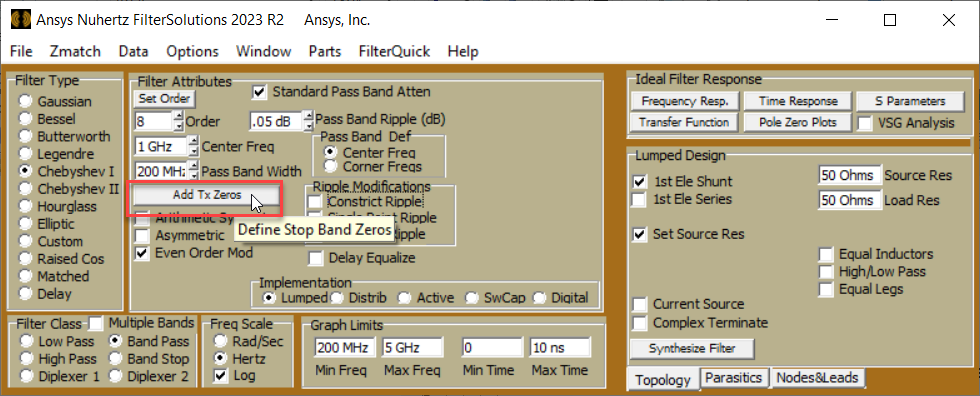
-
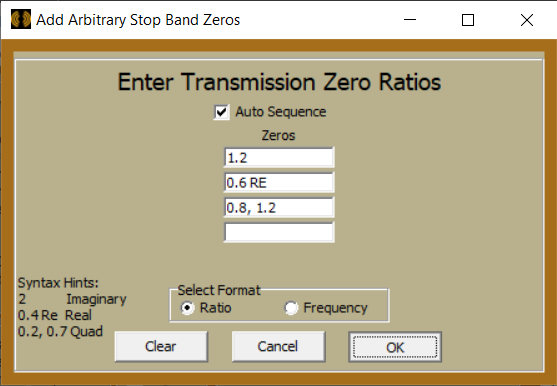
Fill out the pop-up dialog with desired zero positions.
-
Frequency axis zeros are entered as a simple numerical value, "1.2" or "1.2 MHz".
-
Real zeros (useful for group delay manipulation and equalization) are entered with a "RE" suffix, "1.2 RE" or "1.2 MHz RE"
-
Complex zeros, or quadruplet zeros, are entered as two numbers separated by a comma, "0.8, 1.2" for 0.8 + J1.2.
-
-
Select Ratio for zeros normalized to the cutoff or center frequency, otherwise, select Frequency.
Placement rules:
-
Frequency axis zeros may not be placed directly on the passband. Therefore, all ratio values MUST be >1.0.
-
Complex zeros are always created in quadruplet form. Enter one of the quadruplet zeros should be entered, and the other three are created automatically.
-
Distributed Filters support only frequency axis zeros.
Sequencing Zeros in the Ladder Network (lumped filters only)
Check "Auto Sequence" to sequence the zeros automatically. Uncheck to enter manual sequence positions. Final zeros position may differ from manual entries if the ladder network cannot synthesize the desired position(s).