
Specifying Expressions for Adaptive Convergence
You can specify additional convergence criteria through the use of expressions and output variables. The Max Delta or the Max Percent Delta defined for expression convergence represents the difference in values of the expressions between consecutive adaptive passes. If the difference in the value of the expression between consecutive passes is less than the Max Delta or the Max Percent Delta value this part of the convergence criteria is satisfied.
- For driven solutions, if the Maximum Delta S, Maximum Delta E, or alternate matrix convergence criteria are achieved in addition to any specified expression convergence criteria, the adaptive analysis stops. Otherwise, the solution continues until the requested number of passes is completed.
- For eigenmode solutions, if the Maximum Delta Frequency Per Pass criteria is achieved in addition to any specified expression convergence criteria, the adaptive analysis stops. Otherwise, the solution continues until the requested number of passes is completed.
To set expressions as Convergence criteria:
- Double-click the setup icon in the Project tree to open the Solution Setup dialog.
- Click the Expression Cache tab in the Solution Setup and click Add... to open the Add to Expression Cache dialog.
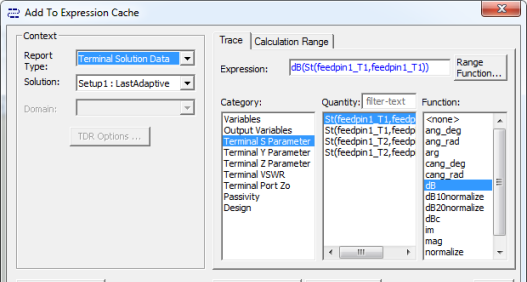
- Specify the context for the expression you define. For Modal Solution Data, you do not need context other than the Solution. Other selections require more context:
- Emission Test also requires a digital signal.
- Far Field field also requires a geometry such as an infinite sphere.
- Fields or Near Fields also require a geometry such as a polyline.
- Under the Trace tab, select from the Category, Quantity and Function lists to create expressions.
Selecting a listed category lists the Quantities and Functions available for each category. If you have defined one or more output variables, you can see them listed as Quantities by selecting the Output Variables Category. The Output Variables button opens a dialog that lets you define additional output variables.
When you have created an expression, it appears in the Expression field of the Trace tab. If desired, you can use the Range Function button to select range functions to apply to the expression.
Under the Calculation Range tab, you can view the values of available sweep variables. Clicking the ellipsis [...] button in the Edit column opens a list of values.
- When you have created an expression that you want to add to the cache, click Add Calculation.
This adds the selected expression and the associated context to a table in the Expression Cache tab. You can select any additional expressions with contexts and add them in the same way.
- When you have added the expressions you want, click Done to close the Add to Expression Cache dialog.
The Expression Cache tab of the Solution
Setup lists the expressions you have added as a table.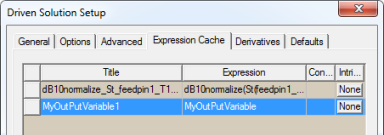
- The Title field is editable, by default showing the name as built from the expression, but removing underscores.
- The Expression field shows the full expression. If necessary, you can resize the Solution Setup dialog box. You can also resize each column in the table.
- The Context column shows None for Modal solutions, or the appropriate geometry for Fields calculations.
- The Intrinsics column shows a clickable button that opens an Edit Calculation Range dialog box. If the column button shows None you cannot edit the value. If the button shows variables, click the ellipsis [...] in the Edit column to display a list of the variable values that you can select. Click OK to close the Edit Calculation Range dialog and apply your selections to the Expression Cache.
- The Convergence column contains a check box that lets you designate post processing variables, such as for renormalization or deembedding. You can also use this feature to assign variables to non-model objects (for example, the properties of a solid, sheet or lines used for field calculations). You can also assign a PP Variable to a coordinate system (CS) that is not associated with model objects.
To excite particular sources for particular output variables, you can assign a post process variable to the magnitude of sources you might want to edit, and assign the expression value in the Expression Cache. With PP Variables, you can control convergence based on several combinations of active sources.
- To designate one or more expressions for convergence, click the field for the Convergence column for each expression.
This opens an Adaptive Convergence dialog.
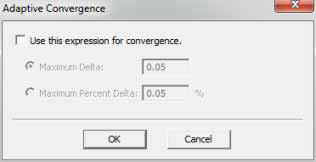
Check Use this expression for convergence to enable the radio buttons. You can then specify the Max Delta between passes or the Max Percent Delta criteria. The Max Delta solves a potential issue if your expression is essentially zero and the numeric noise from pass to pass causes the maximum percentage delta to remain high. In that case adaptive refinement continues until you get to the maximum number of passes.
- Click OK to close the Solution Setup dialog.