
Tools Menu
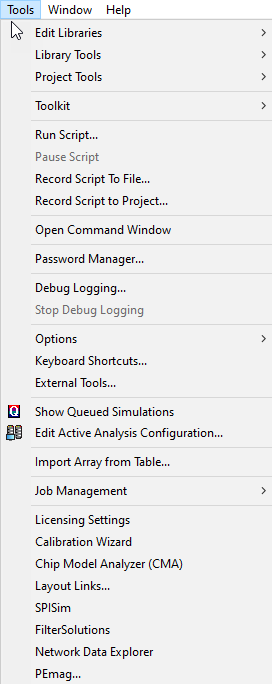
The Tools menu contains operations that are common to the analysis tools.
-
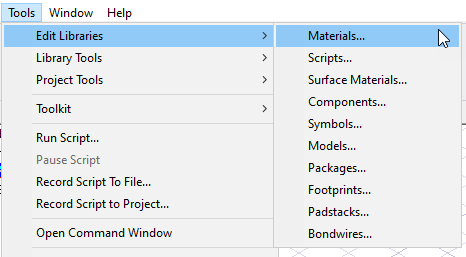
Click Tools>Edit Libraries to view menus allowing access to the libraries available for the various Ansys Electronic Desktop solves, such as Materials, Scripts, and Components, Symbols and Models for Simplorer, Icepak, and Circuit.
-
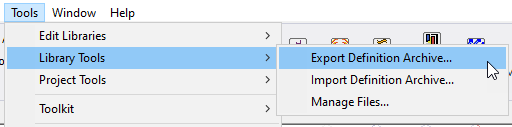
Click Tools>Edit Library Tools to view tools for importing or exporting definition archives for UserLib and Syslib and to manage files relevant for various solver libraries.
-
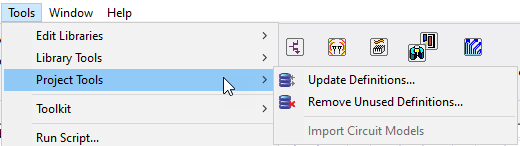
Click Tools>Project Tools to manage definition libraries relevant to various solvers.
-
Click Tools>Toolkit to install or update, or access Python and Python-based toolkits.
-
Click Tools> Runscript... to run scripts that you have recorded. A Pause command is available. You can also Record Script to File... or Record Script to Project.... See the Scripting Help for more information.
-
Click Tools> Command Window... to open an IronPython command window. See the Scripting Help for more information.
-
Click Tools>Debug Logging to enable debug logging via an environment variable. When enabled, the Debug Logging is disabled and Stop Debug Logging is enabled.
-
Click Tools> Options to set General Options and HPC options. You can also Export Optionsfiles.
-
Click Tools >Keboard Shortcuts... to manage your keyboard shortcut behavior.
-
Click Tools> External Tools... to manage menu access to external tools.
-
Click Tools> Show Queued Simulations to view a dialog listing simulations in a queue and providing tools to manage the queue.
-
Click Tools>Edit Active Analysis Configuration to view a dialog that lets you view and manage the current configuration.
-
Click Tools>Import Array from Table to import an array definition from a .csv file.
-
Click Tools>Job Management... to select a scheduler, and to submit and monitor remote simulations.
-
Click Tools>License Settings to launch the Licensing Settings tool.
-
Additional Tools listed include Calibration Wizard, and Network Analyzer, and other tools used to help you with Ansys Electronics Desktop projects and solvers.