
Project Manager Window for Circuit Designs
The Project Manager window of the Ansys Electronics Desktop for circuit designs shows the projects loaded into the desktop. Each project may consist of one or more product designs.
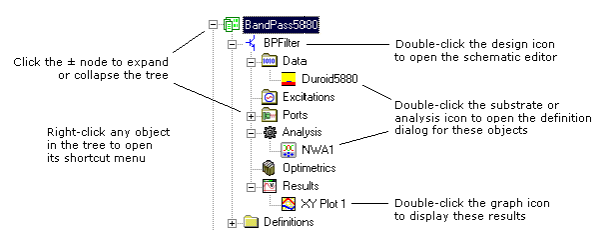
Each design’s model data, ports, excitations, solution setup, and results are displayed as entries in a separate subtree on the Project tab in the Project Manager window of the Ansys Electronics Desktop.
To help facilitate the easy copying of design materials, Ansys Electronics Desktop allows you to drag and drop designs and components from the Project Manager window to the Schematic Editor.
- You can drag and drop one or more copies of a component from the Components folder in the project tree to a schematic. Alternately, you can select Copy from the Project tree right-click menu and then select Paste from the schematic right-click menu (or use the Ctrl+C and Ctrl+V keyboard commands).
- If Multiple Placement is turned on for components in Ansys Electronics Desktop’s Schematic Options dialog box, you can place multiple instances of a component in the schematic by clicking at multiple locations. To stop placing components during multiple placement, do either of the following:
— Press Enter, the spacebar, Backspace, or Esc on your keyboard.
— Right-click, and then select Place and Finish, Finish, Cancel, or Back.