
Open the DC-IV Example
This example demonstrates the I-V Characteristic Curves of an electrical device that show the relationship between the current flowing through the device and the applied voltage across its terminals.
The schematic and data file for the example are available in the Examples directory.
- From the File menu, select Open Examples to open an explorer window.
- In the File Open window, open the Electronics Desktop directory, then Circuit, then RF_Microwave, the DC-IV directory, then select the file DC-IV_Diode_and_Transistor.aedt and click Open.
- The Examples directory is write-protected.
Use File>Save As to save the example project to a directory where you have write permission, then click OK.
The schematics for the DC-IV_Diode_and_Transistor.aedt project open in the design window.
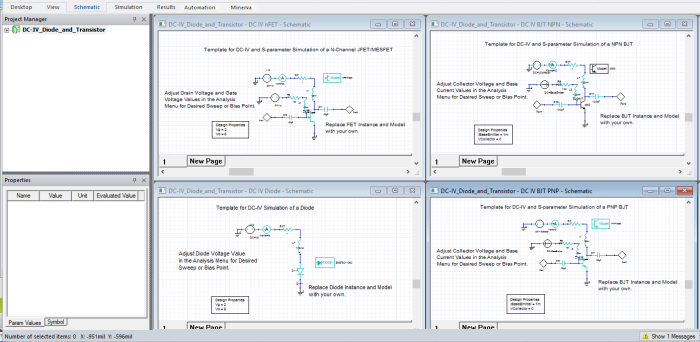
- In the Project Tree, open DC-IV_Diode_and_Transistor and select the DC IV MOSFET design, or any design that is listed.
In the design window double-click the design to make it appear full screen.

- Right-click in the design to open the Design Properties window and adjust any of the properties to meet your needs. The transistor model and instance can even be replaced with your own versions. For more information, see Plot I-V Curves of Active Components.
- Double-click an I-V solution beneath Analysis to make adjustments to the voltage, frequency sweeps, or the lumped circuit element parameters. For more information, see Plot I-V Curves of Active Components.
- Click File>Save to save the project.