
Iterated Fitting of Passivity Violations Low Frequency
Iterated Fitting of Passivity Violations Low Frequency (IFPVLF) is the latest passivity enforcement algorithm (s_element.enforce_passivity=8). It builds upon the default passivity enforcement algorithm (Iterated Fitting of Passivity Violation) by providing a better fit to “Z” at DC and low frequencies.
In a dynamic link simulation, Circuit receives the calculated Scattering Parameter data (S-data) on the field solver. Circuit performs state-space fitting, which generates a macromodel that represents the input/output behavior of the structure modeled in the field solver, and performs time or frequency domain simulations. In many applications such as power delivery networks, Circuit must fit the S-data while also preserving its fit of the corresponding Z-data. This fitting process is called “Z-fitting”.
Often, the generated macromodel is not passive. When passivity enforcement is invoked using the default Iterated Fitting of Passivity Violation (IFPV) method, there is no guarantee that the Z-fit to DC and low frequencies are preserved. Preserving the fit to Z-data at DC and low-frequency can be very important. For example, due to inaccuracies of the fit to Z-data at DC and low frequencies, a DC-DC buck converter may not converge to a correct steady state voltage regulated value. To remedy this issue, Circuit offers a DC/low frequency Z-fitting passivity enforcement called Iterated Fitting of Passivity Violation at Low Frequency. IFPVLF provides advanced passivity protection to preserve Z-fit at the DC point, or a better fit to Z-data at DC and low frequencies, while remaining passive. Ideally, IFPVLF provides a significant improvement when the S-data is casual and passive, and the DC data point should be preserved. Use IFPVLF for passivity enforcement when a better Z-fit at DC and low frequencies are appropriate.
Selecting IFPVLF
To select the IFPVLF algorithm, complete the following steps for either a static or dynamic project.
Static Project
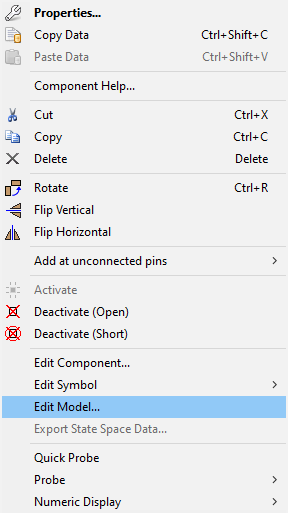
From the Schematic Editor, right-click the model and select Edit Model... to open the N-port data window.
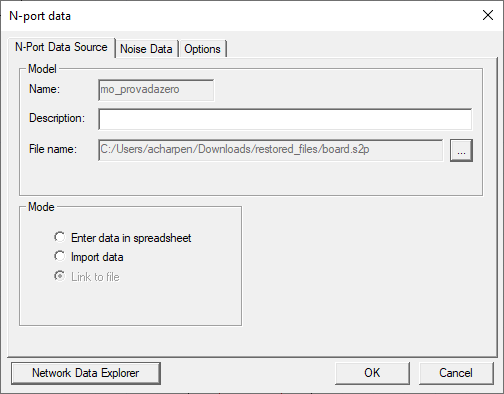
Click the Options tab.
From the Passivity Enforcement drop-down menu, select IFPVLF.
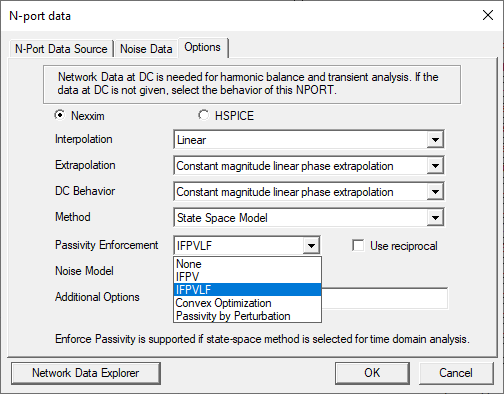
Click OK.
The procedure is complete.
Dynamic Project
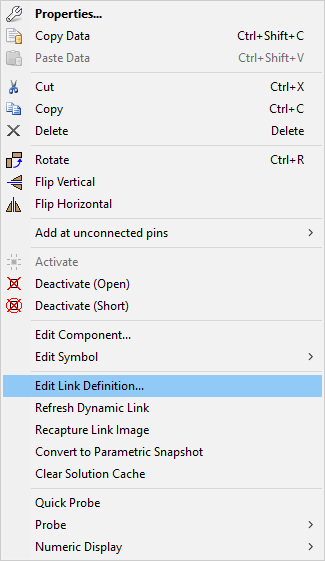
From the Schematic Editor, right-click in the model and select Edit Link Definition... to open the Properties window.
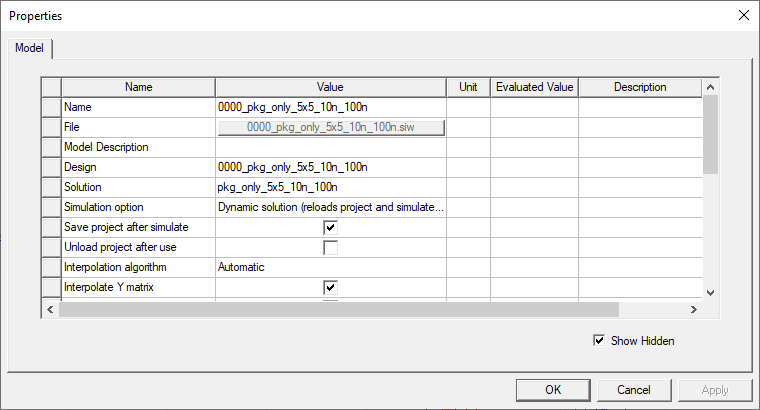
Scroll down and expand Nexxim Options.
Click in the Nexxim Passivity Enforcement Value field and select IFPVLF on the drop-down menu.
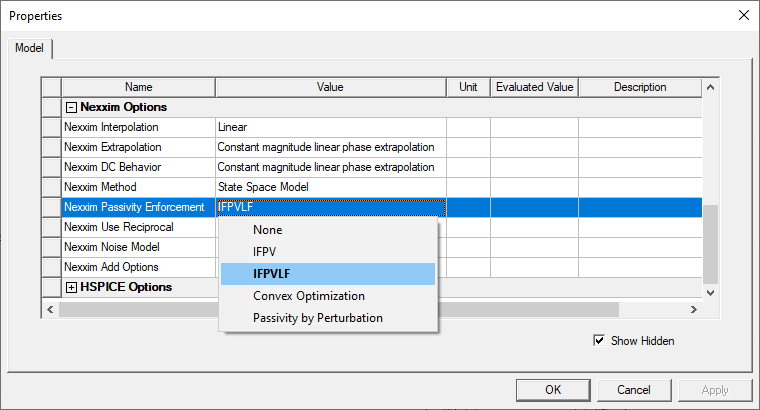
Click OK.
The procedure is complete.
Viewing IFPVLF Algorithm Status
Once analysis has begun, view the status of the advanced DC passivity protection on the log file. From the Project Manager window, expand the Project Tree > [active design folder] > Analysis. Then right-click the transient analysis icon and select Browse log file to open the log file in the operating system's default text editor.
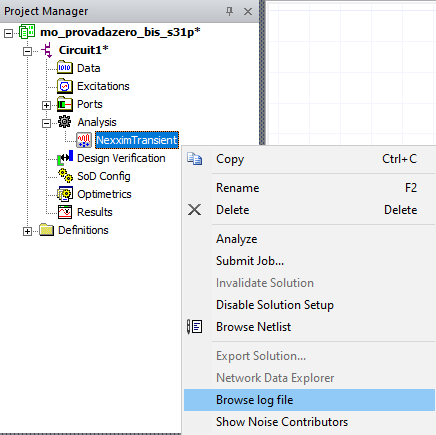
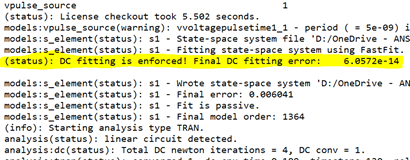
Advanced DC Passivity Protection in Action
Advanced DC Passivity Protection preserves DC fit in scenarios where the fit is destroyed during enforced passivity. A sequence of alternate projections is performed between the sets of all state-space fits. The accurate DC fits and passive fits finally converge to a fit that is both accurate and passive (i.e., fixed point). Advanced DC Passivity Protection utilizes the Anderson Acceleration (AA) Algorithm for fixed-point iterations to quickly reach the intersection of the best DC and passive fit. The resulting macromodel should possess an accurate DC fit that is several magnitudes better than the initial fit, and is also passive.

Deactivating Advanced DC Passivity Protection
To deactivate advanced DC passivity protection, complete the following steps for either a static or dynamic project.
Static Project
From the Schematic Editor, right-click the model and select Edit Model... to open the N-port data window.
Click the Options tab.
Click in the Additional Options field and type [enforce_dc_passivity=0].
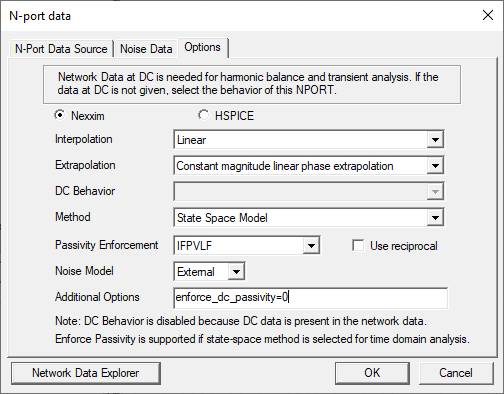
Click OK.
The procedure is complete.
Dynamic Project
From the Schematic Editor, right-click in the model and select Edit Link Definition... to open the Properties window.
Scroll down and expand Nexxim Options.
Click in the Nexxim Add Options field and type [enforce_dc_passivity=0].
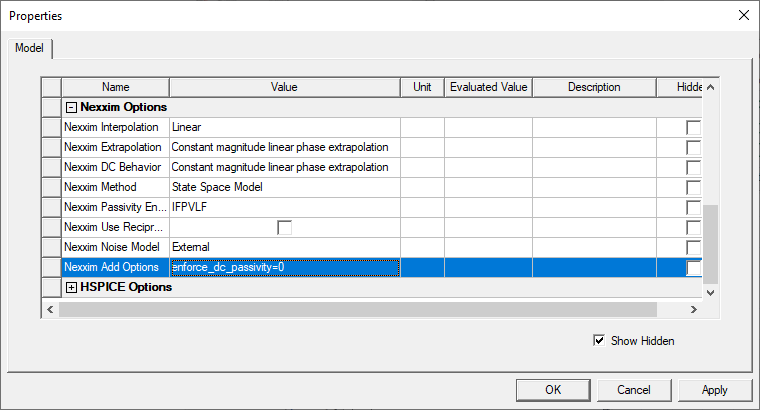
Click OK.
The procedure is complete.