


General Tips and Guidelines for Choosing VDI Hardware
For an overview of virtual machine types and what their names mean, see Understanding Virtual Machine Size Names.
Most virtual machine types have a range of sizes. The larger the size, the higher the cost. Choose the size that best suits the size of problem to be solved. Look at the number of cores and amount of memory available. When considering a multicore machine, make sure that you have enough Ansys HPC Packs to use the cores available on the machine. For more information see Ansys HPC in the Ansys, Inc. Licensing Guide.
To ensure that you are using the latest hardware available, choose newer versions (v4, v5) of a VM size. Older versions may have older-generation hardware.
Windows virtual machines should have a minimum of 2 vCPUs and 8 GB RAM. To ensure quick startup and efficient operation, Ansys recommends a minimum of 4 vCPUs and 16 GB RAM.
You can change the hardware after a virtual desktop has been created. See Changing Virtual Machine Hardware on Demand in the User's Guide.
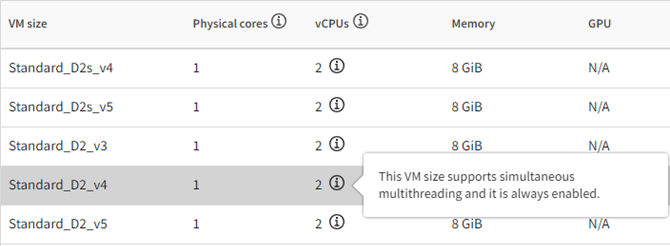
Some VM sizes support simultaneous multithreading/Hyper-Threading and it is always enabled.
To determine whether a VM size supports multithreading/Hyper-Threading, check the vCPUs column in the hardware table. Specifically, look for an information icon next to the number of vCPUs:
Some virtual machine types are available in selected regions only.
To see which virtual machine types are available in each region, go to Products available by region in the Microsoft Azure documentation.
Capacity of a selected virtual machine type can vary depending on the number of users requesting that virtual machine type. If a recommended virtual machine type is not available in the selected location, try a different location or another recommended virtual machine type.
See Insufficient capacity when creating resources in the Troubleshooting Guide.