


| Different FMEA worksheet types | The FMEA spreadsheet views on a system design model in SysML are often focussing on certain aspects, for example exclusively on functions and their malfunctions or structure, i.e. parts/ports with failure modes. The kind of the FMEA worksheet editor can now be used to filter appropriately according to the desired type of FMEA.  |
| Restrict analysis depth of FMEA | Deeply nested system models (e.g. containing the physical structure including the BOM) make it difficult to derive an appropriate reduced FMEA table only for the higher level elements. For this purpose a new option is available to restrict the FMEA spreadsheet structure to a limited nesting depth. 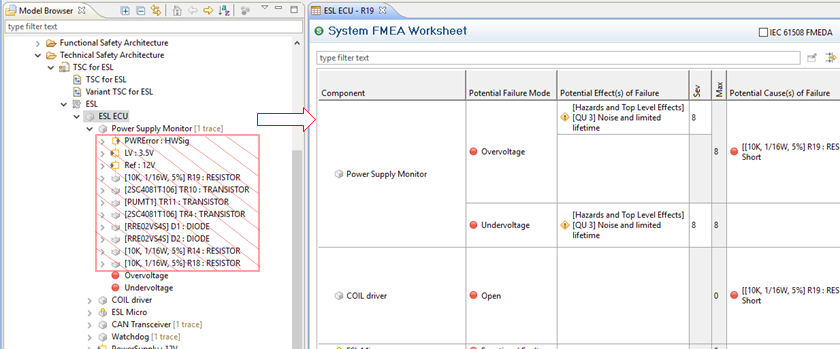 |
| Measure extensions | Measures have been extended to hold a status and target completion date. These attributes will be aggregated at the measure group(s) that appear in an FMEA for failure causes so that status and target dates will be visible and consistently managed (see below). |
| Management of measures and groups of measures | Measure groups are now first class modelling concepts in medini analyze. Measure groups - i.e. the set of prevention and detection controls for a failure cause - were implicitly available via the FMEA editor since a couple of releases. Now they appear visually in the FMEA table editor (and property view) and can have a name, status and target completion date as well as profile properties. Moreover, each measure group defines the occurrence and detection values which is aligned with the VDA and AIAG guidelines. 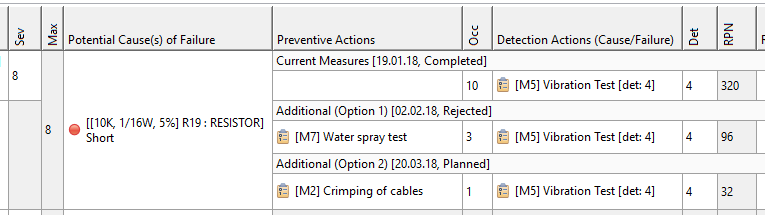 |