


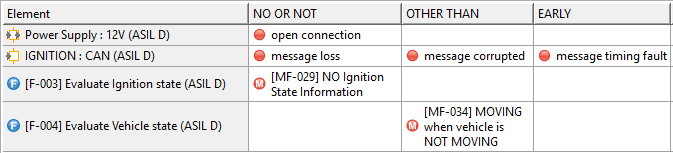
| HAZOP | The support for HAZOP has been extended to identify failures in all system elements, not only functions as before. Elements as ports, parts but also actions and activities can be simply dropped to or selected in any HAZOP table. The appropriate failure type (malfunction or failure mode) is derived from the element type. To create new failures the user can now also drag and drop existing failures from collections to the HAZOP cells.
|
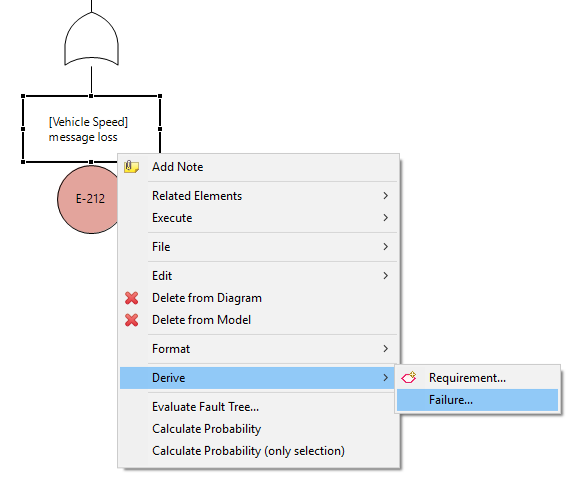
| Failures and FTA Events | With 2019 R2, the interaction between failures in failure nets and events in fault trees has been significantly improved and simplified. Failures can be derived from fault tree events similar to the derivation of requirements. Target of new failures can be any kind of system element or a failure collection - multi-selection is supported. See the integrated help for further options.
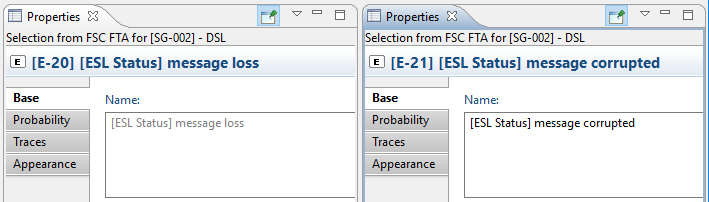
The number of element types that can be dragged from the model browser on any FTA diagram has been increased. With this version, also functions, activities and actions can be dragged to the diagram to create new events. The event name is automatically derived from each element and is kept in-sync as long as it is not overwritten in the event. The user has the chance to overwrite the event name, either in the diagram or the property sheet. Note that event names will not be changed during migration, i.e. all existing events are treated as "overwritten".
|
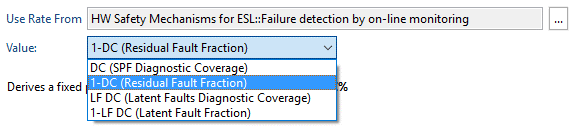
| Probability Models | The "Time Independent" probability mode for SMs has received a new option to select from different methods to calculate the probability from the DC value of SMs.
|