


| MTTF and MTBF | The new release adds three new computations to both the FTA and RBD analyses: Mean Time To Failure (MTTF), Mean Time Between Failure (MTBF), and effective MTBF. While the meaning of the former two should be obvious, the MTBF effective provides a useful measure for systems where maintenance is scheduled in fixed inspection intervals at mission time (e.g. yearly maintained systems) and the repair/replace time is neglectable. |
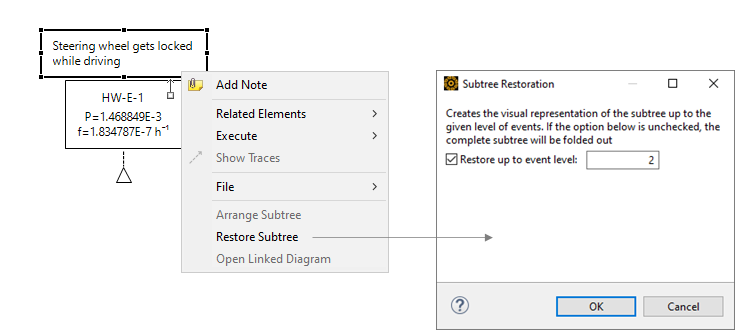
| Restore Subtree Option | The restore/fold-out subtree action for creating new visual representations of an existing fault tree has received a new option. Now you can control the number of levels (i.e. logical gates) that will be created on the diagram.
|
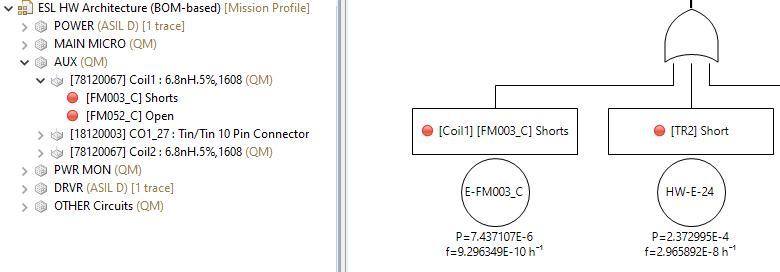
| Derived Event IDs | The creation of fault tree events from malfunction/failure modes has been enhanced by derived (i.e. computed) event identifiers. In previous releases of Ansys medini analyze all fault tree event IDs were not related to the underlying failure ID, but they received an auto-numbered ID by default. Now there are two options: every event that represents a failure receives the same identifier prefixed with "E-" and the ID will be synchronized in case of changes. As alternative, identifiers can be assigned manually as before.
|
| Suppression of MOEs for SMs | The creation of fault tree events for safety mechanisms is frequently used to model the residual fault, i.e. by ANDing the safety mechanism with a fixed probability of "1-DC" to the detected failure. If the same safety mechanism detects multiple failures, there is an easy mistake to make the SM event a multiple occurring event (MOE), which leads often not to the intended results. Therefore, the drag and drop behavior for safety mechanisms will now create duplicated events by default. Background note: Although a MOE might be correct in cases when e.g. a qualitative fault tree is used, the heavy use of creating SM events for the purely computational factor "1-DC" led to the change. You can still create a MOE for the safety mechanism, but only as a explicit action on the diagram. |
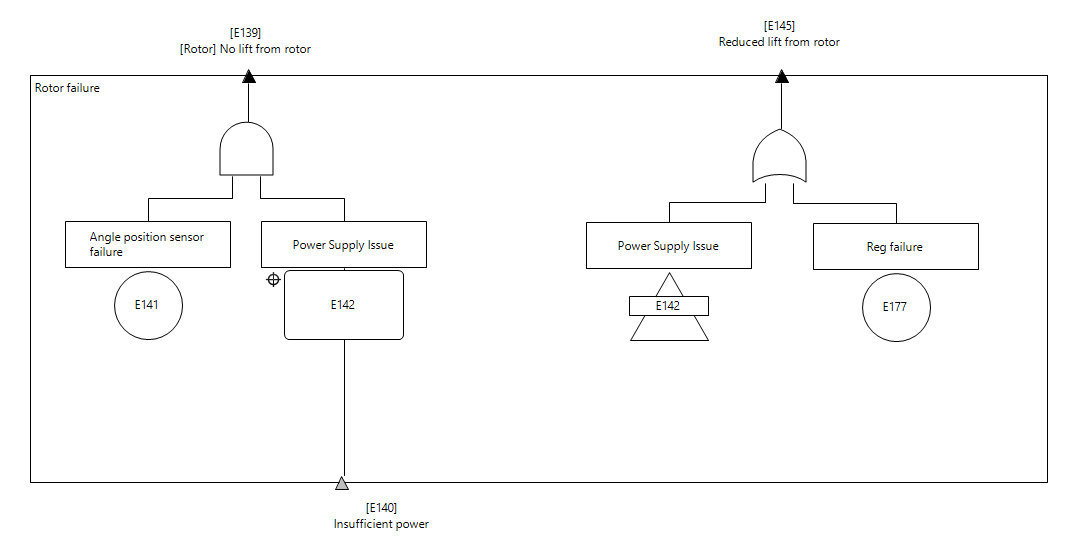
| CFT | Component Fault Trees (CFT) are now integrated into the tool after they have been available as a separate installer since 2022 R2. Note that they are still in beta status. To activate them, you can go to the project settings under FTA / RBD → FTA and check the option "Enable support for Component Fault Tree (CFT) modeling".
|
| Increased Precision | We have improved the precision in the numerical integration for small mission times in FTA/RBD. This might lead to slightely different (i.e. numerically more precise) results e.g. for Weibull distributions or repairable events. |