Start Ansys Workbench.
Note: When Ansys Workbench starts, the Toolbox and Project Schematic are displayed.

Add an Icepak template by dragging the template from the Toolbar under the Component Systems node into the Project Schematic. Perform a right mouse click on the Setup cell. Select Import Icepak Project and Browse to import the optimization-new project and launch Icepak.
The model appears in the graphics display window. Click the isometric toolbar icon (
 ) to display the isometric view of the
model.
) to display the isometric view of the
model.Go to Solve
 Run optimization to open the Parameters and optimization panel.
Click on to display the panel and select the green check marks
to select all input and output variables. Output variables for Workbench are
primary and compound functions in Icepak. Click to save your specifications and click to close the panel.
Run optimization to open the Parameters and optimization panel.
Click on to display the panel and select the green check marks
to select all input and output variables. Output variables for Workbench are
primary and compound functions in Icepak. Click to save your specifications and click to close the panel.
In Workbench, the Parameter Set is displayed. Right-click on A1 and select Update. Double click the Parameter Set bar to display an outline of all parameters and the table of design points.
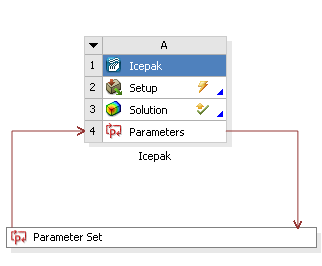
Under the Design Exploration node in the Toolbox, add a Response Surface Optimization template by dragging the template into the Project Schematic.

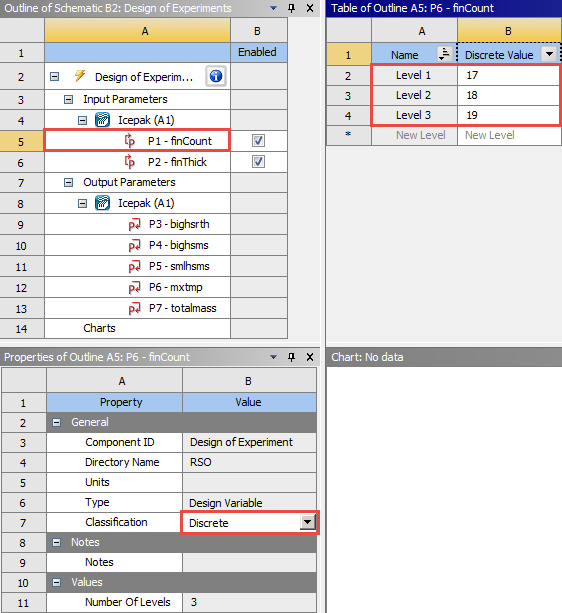
Double-click on the Design of Experiments cell. In the Outline of Schematic, select finCount. In the Properties of Outline, select Discrete for the Classification property. In the Table of Outline, create levels for
17,18, and19fins. To minimize the time spent on the Design of Experiments, only three fin counts will be studied.
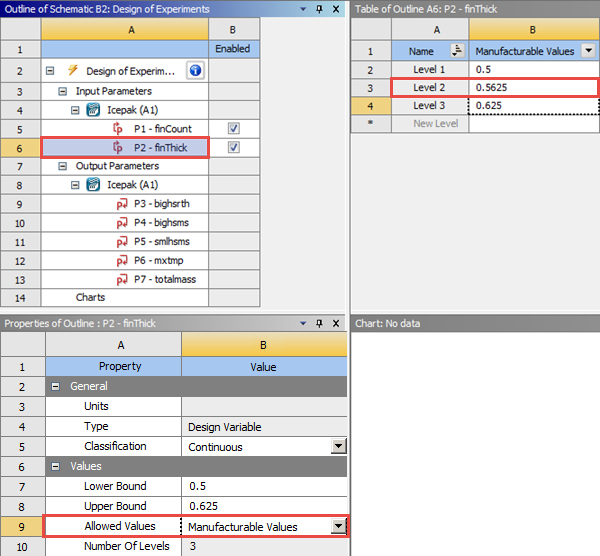
In the Outline of Schematic, select finThick. In the Properties of Outline, set a Lower Bound of
0.5and Upper Bound of0.625and then select Manufacturable Values under Allowed Variables. In the Table of Outline, create a level of0.5625. The fin thicknesses will use only common values rather than a fully continuous range.
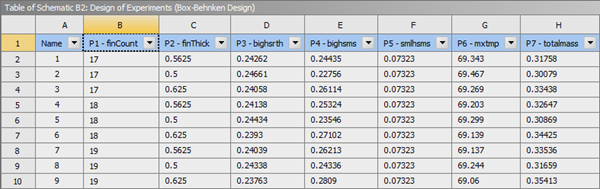
Select Design of Experiments in the Outline of Schematic. To minimize the design space, in the Properties of Outline, select Box-Behnken Design for Design of Experiments Type. Then click Preview to see a preview of design points.
Perform a right-mouse click on the Design of Experiments cell and select Update to run an optimization. The optimization data will provide information of the variable affected the most by the different combinations.
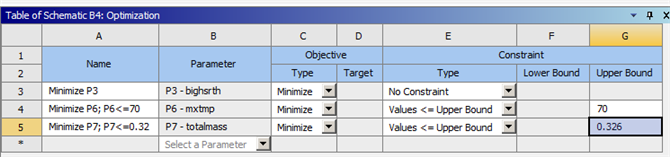
On the Project tab, right-click on the Response Surface cell and select Update. Then double-click on the Optimization cell to open it. Right-click on Objectives and Contraints to insert objectives. Then enter the objectives and constraints as shown in the figure below. Click Update to run an optimization.
To see the Candidate Points selected, click on Candidate Points in the Outline of Schematic. The optimal fin count and thickness are determined.