


Application preferences
Application preferences are settings specific to the application that is currently open.
Explore application preferences
- Unit System
-
Determines the units used to display and enter numerical values in the application. Different unit systems may be available in different databases.
All numerical data values will be converted automatically to appear in the unit system you have chosen. Any data entered is converted to the underlying database unit when it is saved in the database.
- Search panel criteria
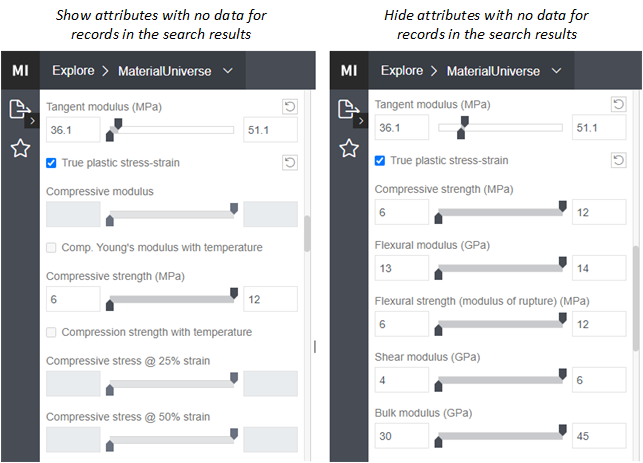
This setting controls whether or not search criteria that no longer apply to the data returned in the current search results are automatically removed from the filters panel.
Hiding attributes with no data for records in the search results can leave you with a more manageable and highly relevant selection of filter criteria.
- Search panel groupings
This setting controls whether or not the search panel groups containing the filter criteria are expanded by default on opening a data view, so that all criteria are visible, or collapsed by default, so only the headings are visible.
With filter groups collapsed by default, you can more easily scan the available filter categories and drill down to find the right filters with less scrolling up and down in the search panel.
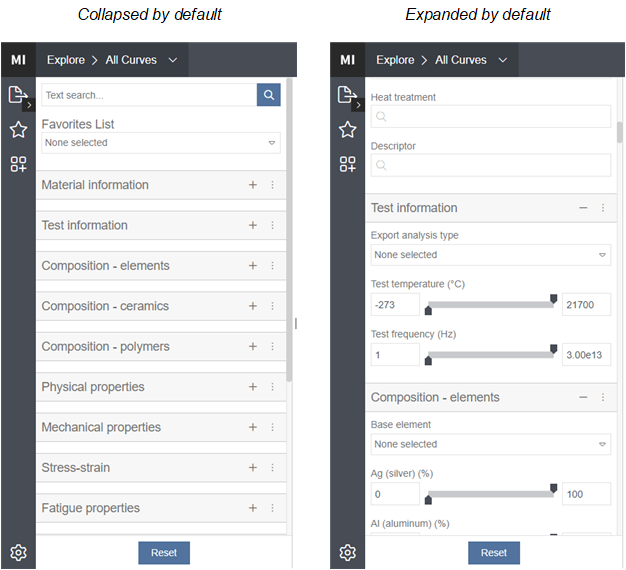 Note: Expand all and Collapse all options are also available on the header action menu.
Datasheet application preferences
- Unit System
-
Determines the units used to display and enter numerical values in the application. Different unit systems may be available in different databases.
All numerical data values will be converted automatically to appear in the unit system you have chosen. Any data entered is converted to the underlying database unit when it is saved in the database.
- Version comparison
-
When comparing different record versions, properties that have changed between the two versions may be highlighted or not.
- Record comparison
- Meta-Attributes in datasheets are not shown in record comparisons by default. Choose Show Meta-Attributes to include Meta-Attributes in record comparisons, if you wish to see them.
Material Calibration application preferences
The following settings apply to Material Calibration:
- Unit System
-
Determines the units used to display and enter numerical values in the application. Different unit systems may be available in different databases.
All numerical data values will be converted automatically to appear in the unit system you have chosen. Any data entered is converted to the underlying database unit when it is saved in the database.