


Exercise 2: Selection using a Limit Stage
Filter records by applying limits to one or more attributes.
-
Select materials with specific thermal and electrical properties.
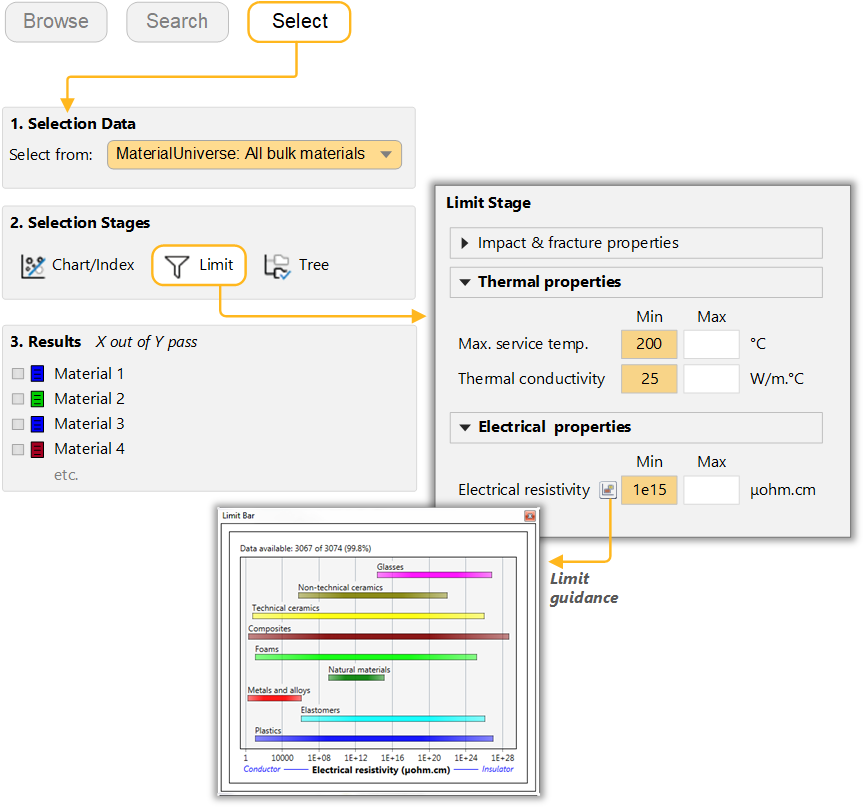
Create a new Limit Stage and enter the following criteria:
- Maximum service temperature
- > 200 °C
- Thermal conductivity
- > 25 W/m.°C
- Electrical resistivity
- > 1e15 μohm.cm
Use the limit bars for guidance on suitable values, and keep "AND" logic selected. If a reference record is set, its values for each property will be shown to the right of the min/max entry boxes.
Enter the limits – minimum or maximum as appropriate – and click Apply.
Example results: Alumina, Aluminum nitride, Silicon nitride.
Note: These exercises have been written using the unit settings ‘US Dollar (USD)’ and ‘Metric’. If you use different settings, the selection criteria and figures will differ. To change the settings, click Settings on the toolbar, and click the Units tab. -
Filter the results further to select only materials with non-opaque
Transparency.
On the Limit Stage under Optical, aesthetic and acoustic properties, set the Transparency to Translucent, Transparent, and Optical quality.
Click Apply.
Example results: Alumina (translucent), Diamond.
- Delete this stage.