


Exercise 1: Combining Filtering and Charting Tools
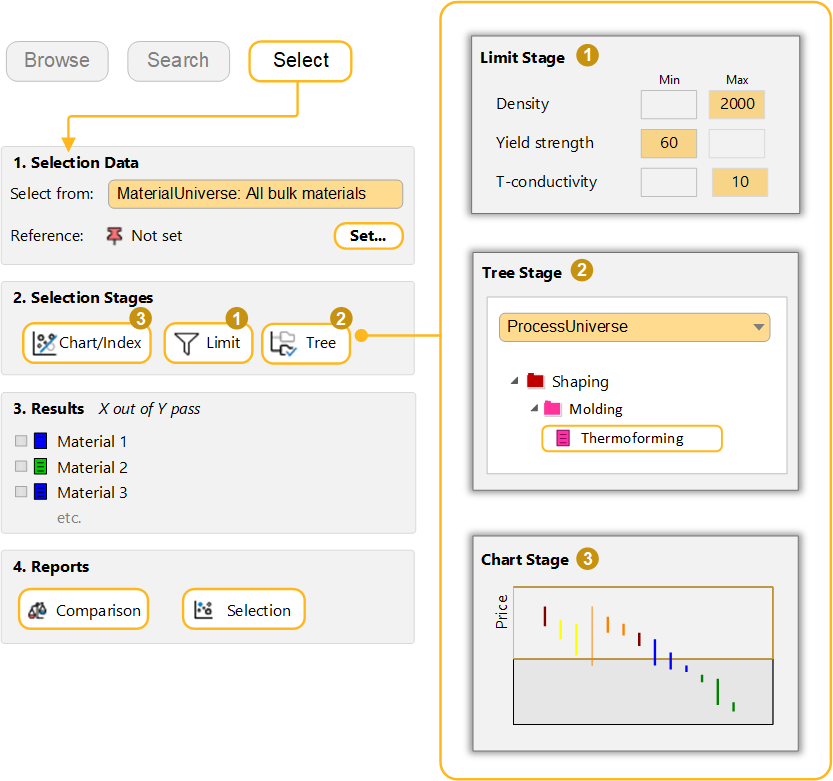
Combine Chart, Limit and Tree stages to identify materials which meet mutlitple selection criteria.
-
Choose the data source and set a reference record.
- Select from:
- MaterialUniverse: All bulk materials
- Reference:
- POM (homopolymer)
-
Select materials with specific physical, mechanical, and thermal
properties.
Add a Limit Stage with the following criteria:
- Density
- < 2000 kg/m^3
- Yield strength (elastic limit)
- > 60 MPa
- Thermal conductivity
- < 10 W/m.°C
-
Filter the results to find those that can be Thermoformed
Add a Tree Stage and select ProcessUniverse > Shaping > Molding > Thermoforming.
-
Rank the results by Price
Add a Chart Stage with a bar chart of Price. On the Chart Stage, all materials that fail one or more stages are grayed out. The Results window lists the materials that pass all stages.
In the Rank by list, select Stage 3: Price.
-
Compare the three cheapest materials
Select the top three records in the Results list and click the Comparison button below the list to add them to a Comparison Table with the reference record.
-
Create a Selection Report
Below the Results list, click Selection.
A selection report is created, containing a summary of the selection project on the first page, details of each selection stage on the following pages, and the comparison table on the final page.
- Delete all stages.