Supported GPUs by Solver
GPU support includes Quadro and Tesla cards and GPU generations (Kepler (K), Maxwell (M), Pascal (P), Volta (V), Turing/RTX, Ampere(A)). GPU acceleration has been developed for Nvidia cards and is officially supported with the Tesla series. We highly recommend NVIDIA Tesla cards for the best performance when using several cards on one machine to solve either multiple variations (DSO) or excitations (HPC) in parallel which is referred to in this document collectively as distributed.
- HFSS Frequency-domain and Time-domain solvers support NVIDIA Data Center GPUs of the Ampere series and Tesla GPUs of the Volta, Pascal, and Kepler generations. NVIDIA Workstation RTX and Quadro GPUs for all generations are not supported except for Quadro GV100.
- HFSS SBR+ solver supports NVIDIA Data Center GPUs of the Ampere series and Tesla GPUs of the Volta, Pascal, Maxwell, and Kepler generations. NVIDIA Workstation GPUs of the RTX and Quadro families are supported by the HFSS SBR+ solver.
- Maxwell solvers support NVIDIA Data Center GPUs of the Ampere series and Tesla GPUs of the Volta, Pascal, and Kepler generations. NVIDIA Workstation RTX and Quadro GPUs for all generations are not supported except for Quadro GV100.
- Ansys EMIT supports NVIDIA Data Center GPUs of the Ampere series and Tesla GPUs of the Volta, Pascal, Maxwell, and Kepler generations. NVIDIA Workstation GPUs of the RTX and Quadro families are supported by EMIT.
- Icepak supports NVIDIA's CUDA-enabled Tesla and Quadro series workstation and server cards.
Driver requirements:
NVIDIA GPU minimum driver requirements are dictated by the NVIDIA CUDA version. The current Ansys EM uses CUDA 10.2 which requires a minimum driver version of 441.22 for Windows x86_64 and 440.33 for Linux x86_64.
We recommend downloading standard NVIDIA drivers for the user-specific cards rather than “DCH” drivers on Windows OS.
To contact Ansys technical support staff in your geographical area, please log on to the Ansys corporate website, ansys.com/support.
nVIDIA Tesla M2090, is a previous generation (code Fermi) GPU card and doesn’t work for Workstation since it has no fan for active cooling but needs a server with GPU cooling solution (passive cooling) similar to the nVIDIA Tesla K80.
To get the best performance, the GPU used for running simulation jobs should not be attached to any display. Only GPU cards with CUDA Compute Compatibility 3.0 (Kepler) and above should be used. To improve the speedup of transient field visualization, you should install GPU cards on a system with PCI-E 3.0 slots. A mixture of interface cards with lower PCI-E versions may result in the data not being transferred from GPU to CPU at the highest speed.
Beta Feature: Sparse Direct Solver - GPU acceleration using NVIDIA cuDSS
A beta feature allows you to use cuDSS GPU acceleration in AutoHPC for HFSS and 3D Layout projects when using the Direct solver. Otherise, GPU is not allowed for AutoHPC. Auto select Direct/Iterative, Iterative and Domain Decomposition solvers are not supported. HFSS transient does not support cuDSS. No other electronics products are supported.
To enable the feature:
-
Enable the cuDSS beta flag via the UI under Tools>Options>General Options>Desktop Configuration, the Beta Options... button.

- Enable GPU usage from the HPC and Analysis Options dialog under “HPC Licensing”:
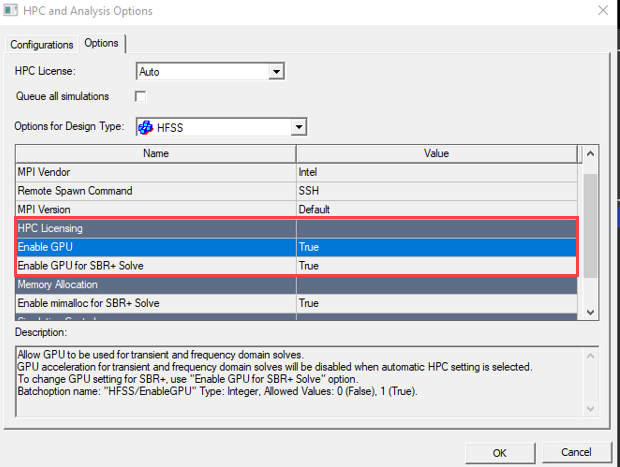
- Allocate the GPU from the HPC Analyis Option UI before running the analysis.
For Use Automatic Settings: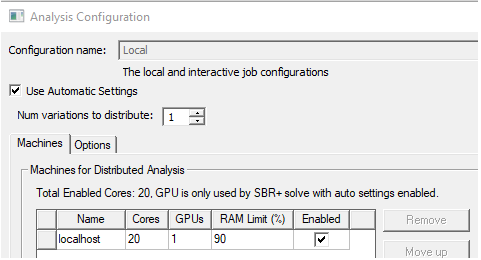
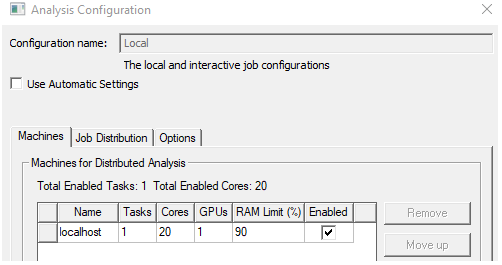
For Manual HPC, GPU usage is supported only for shared memory solve (1 task):
Feature restrictions:
Currently this feature only supports adaptive meshing. Frequency sweeps do not support cuDSS acceleration.
If the cuDSS Beta Feature is ON when solving a frequency sweep with AutoHPC, GPU acceleration is disabled with the following message in profile and message manager:

Otherwise, if cuDSS beta flag is ON when solving frequency sweep with Manual HPC, we fall back to the standard GPU acceleration with the following message in profile and message manager:

Currently the cuDSS Beta Feature only supports one GPU per solved frequency. Multiple GPUs cannot be used to solve one frequency, nor can one GPU be used to solve multiple frequencies.
When solving multiple frequencies per adaptive pass, such as during broadband adaptive meshing, we limit the number of parallel frequencies to be equal to the number of GPUs allocated.
cuDSS is supported only with shared memory solver with AutoHPC. If AutoHPC determines that the distributed memory solver should be used, the following error with be displayed.

You can use Manual HPC instead to force use of shared memory solver to use cuDSS.
Feature activation:
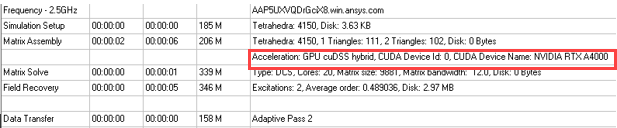
If enabled, the cuDSS usage will be shown in the profile as follows: