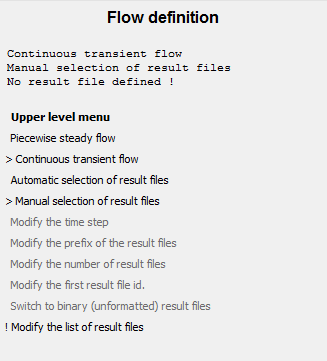
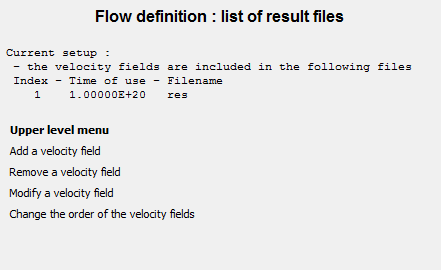
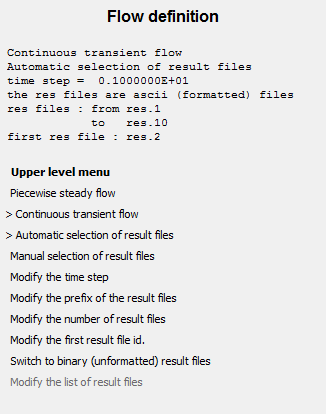
Clicking the Definition of the velocity fields menu item in the mixing task menu for a time-dependent flow simulation opens the menu shown in Figure 3.20: The Flow definition Menu for Time-Dependent Flow.
 Definition of the velocity fields
Perform the following steps:
Select one of the following to specify the kind of flow.
Piecewise steady flow
Continuous transient flow
Specify the list of result files that contain the successive flow fields. There are two ways to specify this:
-
Automatic selection of result files
If Automatic selection of result files is selected (the default), you use the menu items at the bottom of the menu to specify the time step (constant) between two successive flows, the prefix and the format of the Polyflow Classic result files (one particular file for each flow), the number of result files to be read, and the number ID of the first flow. For example, in Figure 3.20: The Flow definition Menu for Time-Dependent Flow, the flow is defined in 10 files, named
res.1,res.2, and so on, untilres.10. The prefix is “res”. The first file isres.2. The time step is 1 second between successive flows. Note that all these files must exist: there cannot be missing result files from the specified sequence. If the lifetime of the material points is greater than time_step * number_of_result_files, the succession of velocity fields are used in a loop. -
Manual selection of result files
If Manual selection of result files is selected, the menu items change, as shown in Figure 3.21: The Flow definition Menu with Manual Selection.
You must specify one by one the list of Polyflow Classic result files that define the flow. To begin, click Modify the list of result files to open the menu shown in Figure 3.22: The Flow definition : list of result files Menu.
Modify the list of result files
In this menu, you can add, remove, and modify the result files, as well as change the order.
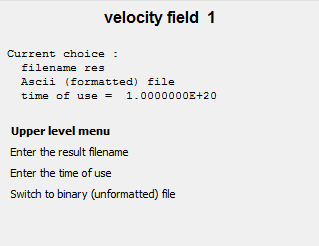
The parameters for a particular velocity field are summarized in a menu like the one shown in Figure 3.23: The velocity field 1 Menu.
You define a new velocity field in this menu, by specifying the name of the result file that stores this field and whether it is formatted. Finally, you enter the time of use of the current velocity field. If the lifetime of the material points is greater than the sum of all times of use, the succession of velocity fields will be used in a loop.
Note: The manual selection mode is not practical if many (such as a dozen) result files must be specified.