


Zemax Black Box
This Export Group Tool is in Sequential UI Mode only.

This feature exports data from one or more surfaces in the Lens Data Editor into a "black box" file. The file can then be later applied to a Black Box surface to be reimported into OpticStudio without revealing the details of the design.
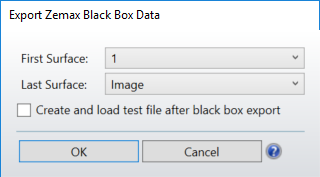
First Surface: The first surface in the range of surfaces to export.
Last Surface: The last surface in the range of surfaces to export.
Lens files with Composite Surfaces are supported by the Export to Black Box tool.
Create and load...: If this option is checked, the current file will be modified to use the newly created Black Box file. Use of this option is highly recommended to confirm the Black Box reproduces the desired analysis data.
General Points to Note
Optical designers may under certain circumstances be hesitant to divulge the details of their optical designs. This is especially true when significant time and cost is involved in creating the design, and the designer may not be compensated for the work until the end customer has verified the design will perform as specified. This creates a dilemma, because sending the complete ZMX file to a customer allows the customer to verify the design performance, but also reveals in full detail the design itself. This feature is designed to satisfy the needs of both the designer and the end customer in these circumstances.
A Zemax Black Box is an encrypted file that contains the prescription data for a range of surfaces. The file contains most all of the data OpticStudio normally associates with a surface, including the radius, thickness, aperture, coordinate, dispersion, and parameter. The file is created by the original designer that holds the intellectual property rights. The file is then sent, usually as part of a complete "playback" OpticStudio lens file, to the end customer. The encrypted data appears as a "black box" in the Lens Data Editor. Rays go in, and the rays come out, exactly as if the original surfaces and design data were present in the Lens Data Editor. However, the detailed data is actually hidden inside the Black Box, and the user cannot review or modify any of the data contained within the hidden Black Box section.
To create a Black Box file, highlight the desired range of surfaces in the Lens Data Editor, and then select the Export Black Box icon in the Export group of the File Tab. The surface range may also be selected from the Export Black Box Data dialog control directly. The only other option is a check box to "Create and load test file after black box export".
Use of this latter option is highly recommended, as it allows confirmation that the Black Box was created properly and yields the identical ray tracing and analysis results. The "Create" option will create a test lens file with the same name as the original file, except the letters "_BB" are appended to the end of the name. If a file with the same name as the test file already exists, it will be automatically overwritten. The black box data itself is created in a file with the extension ZBB, and this file is placed in the folder <data>\BlackBoxes. This newly created file will be referenced on the Black Box Lens surface in the Lens Data Editor, and will replace the original surface data in the editors. The name of the Black Box file may not exceed 32 characters, including the .ZBB extension.
Once the Black Box and test playback file are created, it is recommended that the archive feature be used to make a single archival file that can be sent to the end user. See Create Archive
For more information on the Black Box surface, see Black Box Lens.
The Black Box data structure is designed so that no OpticStudio feature can read or query the prescription data of the surfaces within the Black Box. Rays enter the Black Box, and the rays are traced using the data defined within, but no feature is able to access the curvature, thickness, glass type, aspheric constants, or other data. The refractive lenses in the Black Box are modeled using the full dispersion data from the original file, and thus can be "played back" at any wavelength. If a playback wavelength exceeds the limits of the dispersion data, an error is issued. If any ray is vignetted or TIRs inside the Black Box, it is treated as a "ray miss" error. Note that some features, such as those that compute the weight of a lens, will not be able to access the Black Box data either and will thus return meaningless data for Black Box Lens surfaces.
The black box is drawn on layout plots as a cylinder with a radial aperture defined by the clear semi-diameter or semi-diameter of the first surface in the selected range of surfaces when the black box was created, or by the largest radial aperture of any surfaces within the selected range, whichever is larger. The length of the black box as drawn is equal to the sum of the lengths of the surfaces within the selected range.
There are some restrictions on the type of data that may be exported to a Black Box file:
- Neither the first nor the last surface of the specified range may be ignored.
- If the first surface follows an even number of mirrors, so must the last surface. If the first surface follows an odd number of mirrors, so must the last surface. Neither the first nor the last surface may be mirrors. The range of surfaces may be intended to be used in a mirror space or not, however, the playback will only work if the file is properly set up after either an even or odd number of mirrors as was the set up for the original file. In particular, tools that automatically add mirrors to the system (Add Fold Mirror and Make Double Pass) should not be used with a Black Box Lens as they will generate incorrect results without an error message.
- Coordinate Break surfaces and surface tilts and decenters are permitted, however the last surface must be oriented in the same coordinate system as the first. This means the local X, Y, and Z axis of the first and last surfaces must all be parallel, and the X and Y decenters must be zero (both limits are tested to a fine tolerance set internally by OpticStudio).
- The surface previous to and after the Zemax Black Box surface cannot be Coordinate Break when running POP simulation. Note this restriction only applies when POP simulation is running.
- Not all surface types are supported. Nonsequential, Birefringent, Paraxial, and surfaces that use external data, such as user defined DLL surfaces and grid sag surfaces, and a few other special surface types are not supported. If a need arises for a surface type that is not supported, contact technical support for assistance.
- The stop cannot be placed in between the first and the last surfaces, although the stop may be either of these surfaces. To export lens data on either side of the stop surface, use two (or more) Black Boxes. Any number of Black Box Lens surfaces may be used in the playback system.
- If any coatings are applied to the surfaces within the Black Box, they must be either standard coatings with no tapers, or encrypted coatings (see "Export Encrypted Coating" on page 283). No ideal or table coatings are supported. The export to Black Box feature will automatically convert all non-encrypted coatings to encrypted coatings. The coating name will be changed by prepending "ZEC_" to the existing name. For example, the coating named BB_AR_5 will be exported as an encrypted coating file with the name ZEC_BB_AR_5. If this file already exists, it will be overwritten without warning. The encrypted coating data is not stored within the ZBB file, the data must be included separately when sent to the end user. By far the easiest and most reliable way to do this is to send the resulting Black Box lens system with the coatings in an Archive (ZAR) file.
- Apertures must be placed on all surfaces with power, so that when used the black-box file will correctly clip rays outside of the aperture of the lens. For a tool that converts clear semi-diameter or semi-diameters to apertures see "Convert Semi-Diameters to Floating Apertures" on the Lens Data Editor Toolbar, or apertures can be set by hand using the Aperture tab of the Properties Inspector in the Editor.
- User-defined aperture data files (.UDA) are not supported.
- Note any rays vignetted by the black box surfaces are treated as ray miss errors in the playback system, and this can cause some features to not work properly with certain optical systems, such as telescopes with central obscurations.
- Features that require access to specific surface data cannot reproduce the same results from a black box file as the original file can.
- Only data for the current configuration is exported. Instead, in a multi-configuration system, each configuration must be exported separately. Upon loading into the playback system, the file name of the ZBB files used can be changed for each configuration using the MCOM operand) in the multi- configuration editor if multiple-configuration control of the black-box system is required.
- Any data controlled by solves are replaced by their current fixed values. No solves are supported inside the Black Box surface. If "Create and load" is selected any solves for surfaces outside the newly created blackbox that reference data now within the blackbox are also turned off.
- Model and Table glasses are not allowed - all dispersion data must be defined in the current glass catalogs. The dispersion data will be extracted from the glass catalog and placed in the black box file. The exception is for gradient index surfaces as described below.
- Index data for gradient index surfaces is generally defined in parameter data that is encrypted within the black box. Gradient 5 surfaces, when converted to a black box, store the gradient polynomial parameters in encrypted form, but the dispersion data remains as defined in the unencrypted SGRIN.DAT file normally installed with OpticStudio. Gradient 6 surfaces, which use dispersion data defined in the GLC.DAT file, also use the unencrypted data in that file normally installed with OpticStudio.
- Surface scattering is not currently supported on surfaces inside a black box.
- Lens files with Composite Surfaces are supported.
The encryption is based upon a 256-bit algorithm. The user should determine if the encryption implemented provides adequate security for the intended application before distributing sensitive data in the encrypted format.
Next: