


Modules and Namespaces
Organization of models and libraries through namespaces and modules
Module Overview
A Swan module is defined by one module body and/or one module interface
- the module body is serialized into module_name.swan
- the module interface is serialized into module_name.swani
The body and interface of a module match by name but can be stored in different projects.
- constant
- type
- group
- sensor
- operator
where
- a declaration introduces an element with its kind (type, constant, ...) and the typing information to check its correct usage. No information related to the implementation is given in the declaration.
- a definition introduces an element with its value or implementation.
Module Use Cases
There are four use cases:
- Public interface of a module: if a module interface is defined, only
elements in the interface are public and then usable by another module.
Using interfaces is optional. If only a module body is defined, all its content is public.
- Declaration of external (imported) declarations: any element declared but not defined is considered as imported. Its corresponding definition is directly implemented in C.
- Software Architectural Design: the software architecture can be defined through its modules and interfaces to specify the components and data exchanged between components. The implementation can be provided later in the module body.
- Design test independently of the implementation: providing only declarations in the interface of a module allows the test manipulating a type or an operator without looking at its implementation, and then focus the test objective on the functional behavior.
Namespace Overview
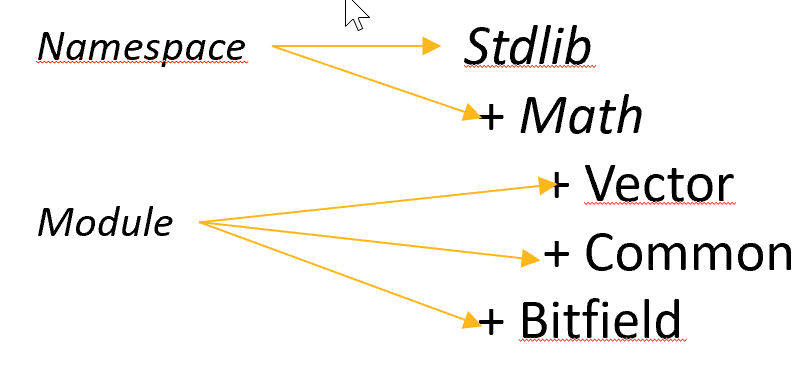
Namespaces allow to organize modules. A namespace can contain namespaces and modules (but no declarations or definitions).
A module cannot contain another module.
Namespaces avoid naming collisions between modules. Two modules can have the same name provided that they are not in the same namespace. Namespaces can be seen as folders.
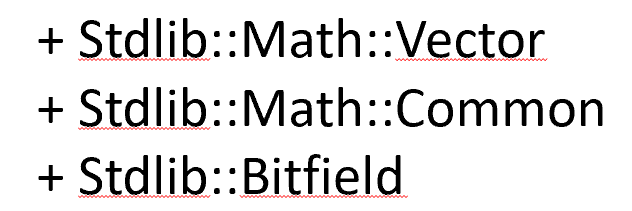
Namespaces are denoted with a path in the module declaration, the path starting from the top-level namespace.
| Namespaces as a tree | Namespaces as a flat list |
 |
 |
A namespace is serialized in the file system by replacing each :: in the path by a - (see Module).
For example, the body of StdLib::Math::Vector is serialized as StdLib-Math-Vector.swan.
Using a Module
If a declaration from a module M1 is used in a module M2, a use directive must be added in M2 to allow to use declarations of M1.
For example, if a module M needs to use a function from the StdLib::Math::Vector module , the following use directive must be added at the beginning of M:
use StdLib::Math::Vectorand then in M, each element of Vector is prefixed by Vector only, not by the whole path. For example, an operator product defined in StdLib::Math::Vector, will be referenced as Vector::product in M.
The use directive allows to introduce a local alias module. It avoids name collision if two modules have the same name in two different namespaces, or it is a mean to give a shorter name.
use StdLib::Math::Vector as VecFor example, an operator product defined in StdLib::Math::Vector, will now be referenced as Vec::product in M.