


Geometric MTF vs. Field
Computes the geometric modulation transfer function data as a function of field position.
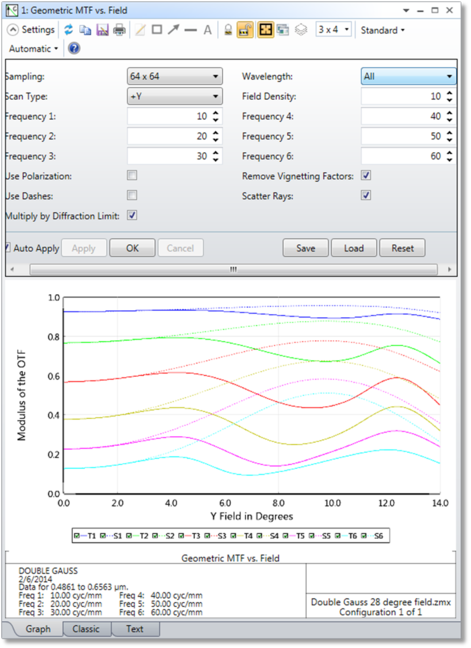
Settings The settings are identical to those for the FFT MTF vs. Field feature, with the added ability to scatter rays, and a choice to scale by the diffraction limit or not.
Sampling The size of the ray grid used to sample the pupil. The sampling may be 32x32, 64x64, etc. Although higher sampling yields more accurate data, calculation times increase.
Frequency 1-6 The spatial frequencies (see "MTF Units") for which data is plotted.
Wavelength The wavelength number to be used in the calculation.
Use Polarization If checked, polarization is considered.
See " Polarization (system explorer) " for information on defining the polarization state and how polarization is used by analysis features.
Use Dashes Selects either solid lines or dashed lines to differentiate the various curves. This setting only applies to the Classic view, which is an option if "Enable Classic View" is selected in the Graphics tab of the OpticStudio Preferences.
Remove Vignetting Factors If checked, vignetting factors are automatically removed. See the comments about vignetting factors in the discussion section below.
Field Density The field density is the number of points between zero degrees and the maximum field at which the MTF is calculated, intermediate values are interpolated. A maximum of 100 field points is allowed.
Scan Type Choose +y, +x, -y, or -x field scan direction.
Discussion This feature is nearly identical to the (diffraction) MTF vs. Field feature, except the geometric MTF is used rather than the diffraction based MTF
Next: